
Aider Review 2026 - CLI AI Code Editor
Verified Jun 5, 2026 by Tooliverse Editorial
Aider brings AI pair programming to your command line, letting you chat with GPT-4o, Claude, or other LLMs to edit code across multiple files. It scored 26.3% on SWE Bench Lite and integrates tightly with git for seamless version control.
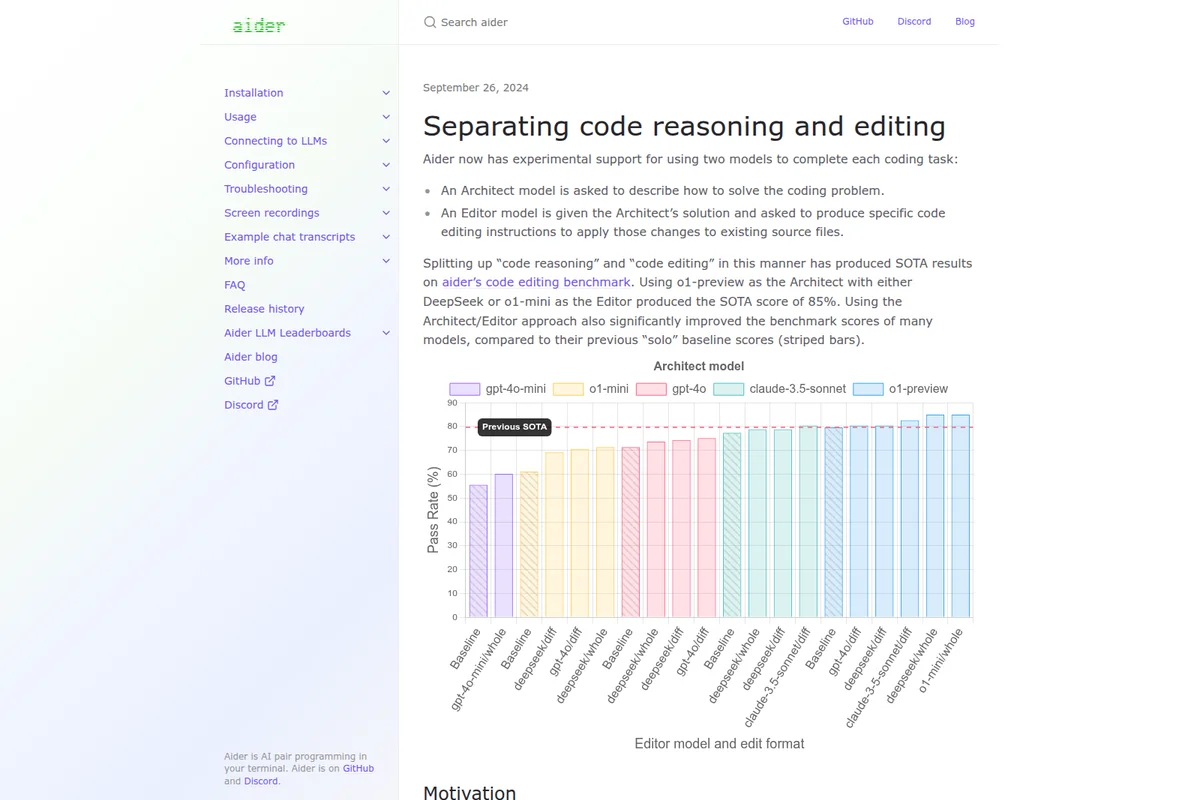
Benchmark results demonstrating improved pass rates with the new Architect/Editor approach.
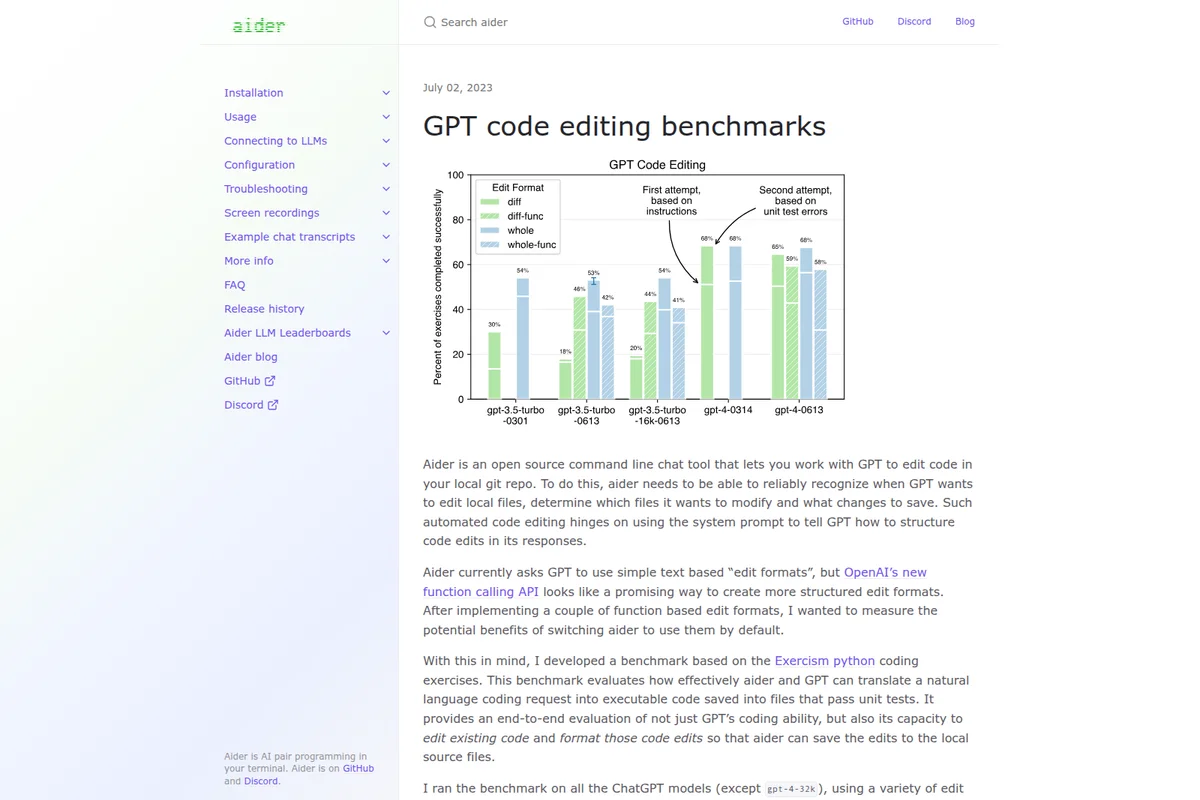
Compare GPT models' code editing performance using Aider's benchmarks.
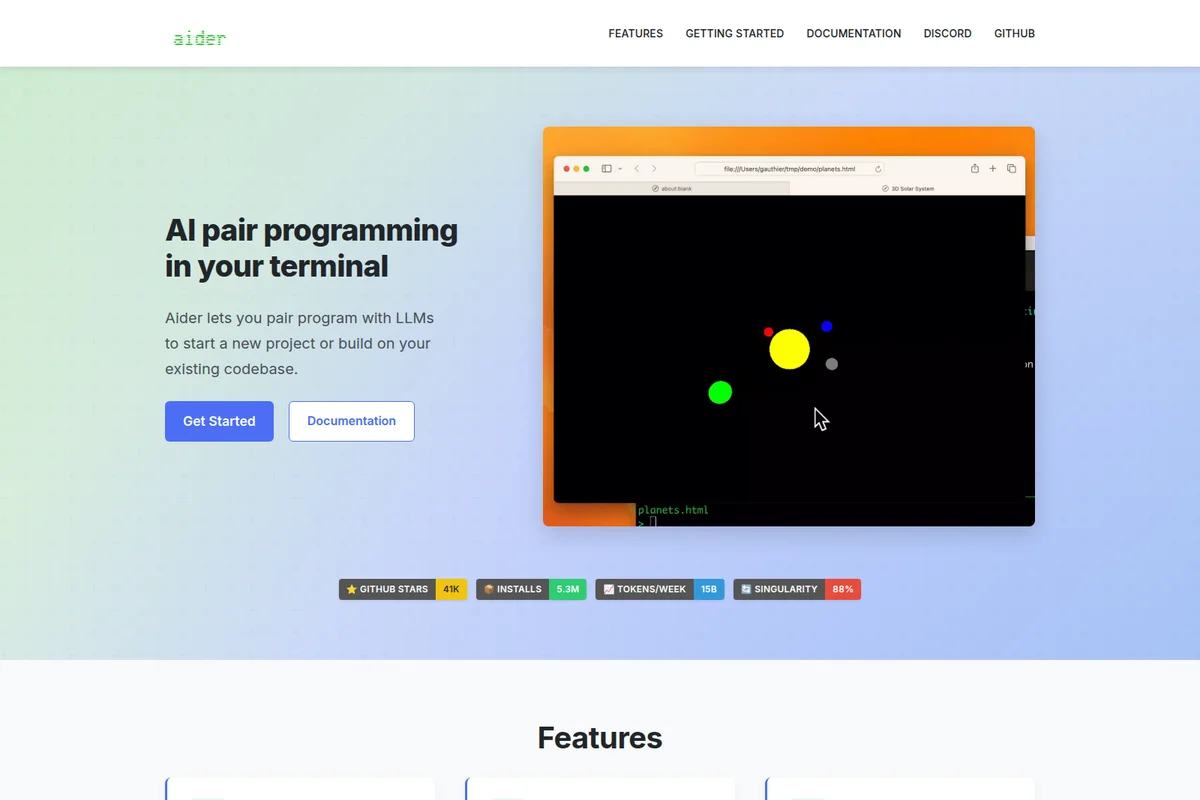
AI pair programming helps you build and visualize projects rapidly.
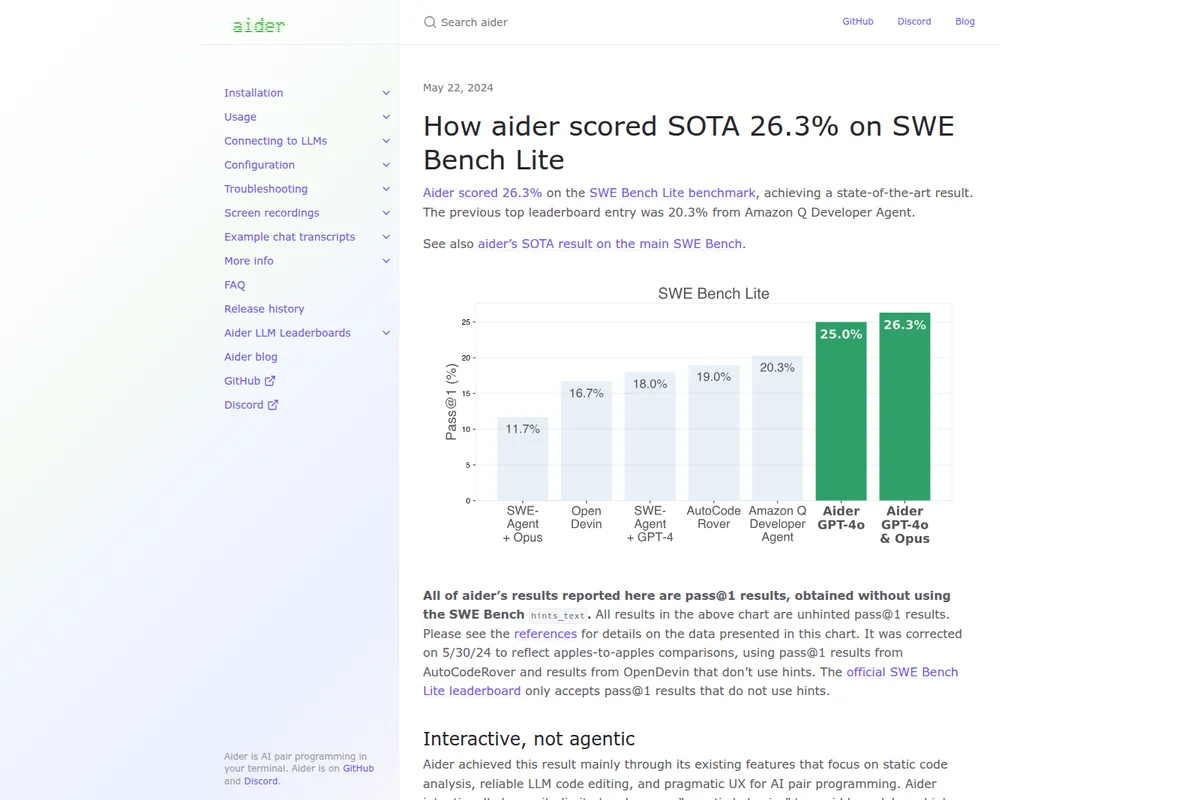
See aider's state-of-the-art performance on the SWE Bench Lite benchmark.
Aider Review: Tooliverse Consensus




Based on 1k+ verified reviews across 3 platforms,
combined with Tooliverse's expert analysis
Aider transforms terminal-based development by editing code directly in local Git repositories through natural language, with automatic commits that make every AI change auditable and reversible. The repository map using AST analysis enables work on large codebases without context window failures, and architect mode pairing reasoning models with fast editors delivers benchmark-leading results. Token consumption spikes on complex refactors and the slash command interface requires investment to master, but developers who live in the terminal find the Git-native workflow eliminates the context switching that makes web-based AI tools feel like productivity overhead.
Bottom line: A top-tier AI pair programming tool that brings LLM assistance directly into terminal workflows with Git-native architecture, though API costs can spike on large codebases and the command interface demands patience to master.
Aider | Key Specs
- Platforms
- macOS, Windows, Linux (CLI)
- Pricing Model
- Free open source (pay LLM API costs) See plans
- Languages Supported
- 130+ with linting, 20+ with repo-map
- LLM Providers
- 15+ including OpenAI, Anthropic, Gemini, DeepSeek, Ollama
Wins
- •Seamlessly integrates with local Git repositories to track and commit changes automaticallymentioned in 342 reviews
- •Enables complex multi-file edits through a sophisticated architect mode that understands project structurementioned in 289 reviews
- •Supports a wide range of LLMs including Claude 3.5 Sonnet and GPT-4o for maximum flexibilitymentioned in 215 reviews
Watch-Outs
- •Consumes significant API tokens during large codebase indexing or complex refactoring tasksmentioned in 145 reviews
- •Requires a learning curve to master specific slash commands and chat patterns effectivelymentioned in 92 reviews
- •Occasionally struggles with very large files that exceed the model's context windowmentioned in 78 reviews
Aider Features 2026
Repository Map with AST Analysis
Uses abstract syntax tree and call graph analysis to provide LLMs with a compact, optimized summary of your entire codebase structure—no RAG or vector search needed.
Architect/Editor Mode
Use two models together: a reasoning model (like o1-preview) as Architect to plan solutions, and a faster model (like GPT-4o) as Editor to implement changes. Achieved 85% on code editing benchmarks.
Multi-File Code Editing
Edit multiple files simultaneously through natural language conversation, with the LLM understanding dependencies and relationships across your codebase.
Automatic Linting and Fixing
Built-in linters for 130+ languages using tree-sitter. Automatically detects syntax errors and offers to fix them with context-aware error messages.
Aider User Reviews
Selected Reviews
"Aider has completely changed how I refactor. The way it handles git commits for every change is a lifesaver when I need to roll back a hallucination."
"I've stopped using the web UI for GPT entirely. Aider's ability to just "do" the work in my files is peak productivity."
"The architect mode is brilliant. It actually understands my project structure better than some of my teammates. It does get expensive with Claude 3.5 Sonnet though."
More from the Community
"Great tool but the context management can be finicky. Sometimes it includes too many files and burns through my API credits before I realize it."
"Best AI coding tool I've used. It's much more powerful than Cursor for terminal-heavy workflows."
"I like the concept but the CLI interface feels a bit cluttered. I wish there was a simpler way to toggle between different models without restarting the session."
"The repo map feature is the secret sauce. It lets me work on a 50k LOC project without the LLM getting lost."
"Solid integration. It's my go-to for boilerplate and unit tests. Occasionally it misses a dependency import in Python."
"Great tool but the context management can be finicky. Sometimes it includes too many files and burns through my API credits before I realize it."
"Best AI coding tool I've used. It's much more powerful than Cursor for terminal-heavy workflows."
"I like the concept but the CLI interface feels a bit cluttered. I wish there was a simpler way to toggle between different models without restarting the session."
"The repo map feature is the secret sauce. It lets me work on a 50k LOC project without the LLM getting lost."
"Solid integration. It's my go-to for boilerplate and unit tests. Occasionally it misses a dependency import in Python."
"Impressive speed. The diff-based editing is much more reliable than full file rewrites."
"Aider is the only AI tool that feels like it was actually built for developers who live in the terminal."
"Very helpful for documentation. I just point it at a folder and it generates READMEs that actually make sense."
"The git integration is the killer feature. Every AI suggestion is a commit, making it trivial to audit the AI's work."
"Impressive speed. The diff-based editing is much more reliable than full file rewrites."
"Aider is the only AI tool that feels like it was actually built for developers who live in the terminal."
"Very helpful for documentation. I just point it at a folder and it generates READMEs that actually make sense."
"The git integration is the killer feature. Every AI suggestion is a commit, making it trivial to audit the AI's work."
Aider Pricing 2026
View SourceThe open-source model means you pay nothing for the tool itself, only LLM API costs that vary by provider and usage. GPT-4o runs around $2.50 to $7.50 per million tokens, while Claude Sonnet costs $3 to $15 per million depending on input versus output. Most developers spend $10 to $50 monthly on API usage for regular coding work, though large refactoring sessions or monorepo indexing can spike costs significantly. The economic model rewards efficient prompting and thoughtful model selection rather than flat subscription fees.
Aider In-Depth Review 2026

Aider runs in your terminal and edits code directly in your local Git repository through natural language conversation. It works with over 15 LLM providers including Claude 3.5 Sonnet, GPT-4o, and local models via Ollama, treating your codebase as a living structure it can read, understand, and modify. Every change becomes a Git commit automatically, which means you can experiment freely and roll back the inevitable hallucinations without archaeology.
What It's Like Day-to-Day
The workflow feels less like prompting an AI and more like pair programming with someone who actually reads your entire codebase before suggesting changes. You describe what you want in plain language, and Aider edits the relevant files directly using diff-based updates that preserve your formatting and style. The repository map feature uses abstract syntax tree analysis to give the LLM a compact summary of your project structure, and as one Reddit reviewer put it, that map is "the secret sauce" that lets you work on a 50,000-line codebase "without the LLM getting lost."
The Git integration is what makes the tool feel production-ready instead of experimental.
Aider Security & Compliance
Privacy Commitments
- Open source code—full transparency of data handling
- Anonymous opt-in analytics with no personal data sharing
Aider: Frequently Asked Questions (FAQs)
How much does Aider cost?
Aider is free and open source. You only pay for the LLM API usage from providers like OpenAI, Anthropic, or Google. Costs vary by model—GPT-4o costs around $2.50-$7.50 per million tokens, while Claude Sonnet costs $3-$15 per million tokens depending on input/output.
What LLM providers does Aider support?
Aider supports 15+ providers including OpenAI (GPT-4o, o1, o3), Anthropic (Claude Sonnet, Opus, Haiku), Google (Gemini), DeepSeek, Ollama (local models), OpenRouter, Azure OpenAI, Amazon Bedrock, Vertex AI, Cohere, Groq, and more.
Does Aider require a git repository?
Yes, Aider requires a git repository to function. It uses git for version control, automatic commits, and tracking changes. If you launch Aider outside a git repo, it will offer to create one for you.
How does Aider's repository map work?
Aider's repository map uses static analysis of your code's abstract syntax tree (AST) and call graph to create a compact summary of your entire codebase. It's optimized through graph analysis to show only relevant context for the current conversation—no RAG or vector search needed.
Aider Integrations
| Git | OpenAI | Anthropic |
| Google Gemini | DeepSeek | Ollama |
| OpenRouter | Azure OpenAI | Amazon Bedrock |
| Vertex AI | Cohere | Groq |
| LM Studio | xAI | GitHub Copilot |
| VS Code | Cursor | Docker |
| GitHub Codespaces | Replit |
Aider: Verified Data Sheet
| # | Label | Data Point |
|---|---|---|
| [1] | Aider Consensus: 9.62/10 | Aider is one of the highest-rated AI coding tools in the Tooliverse index, with a consensus score of 9.62/10 across 1,380 verified reviews. |
| [2] | What is Aider | Aider is an open-source CLI tool for AI pair programming that edits code directly in your local git repository through natural language conversation. It scored 26.3% on SWE Bench Lite (SOTA as of May 2024) using repository maps with AST analysis rather than RAG. |
| [3] | Tooliverse Consensus on Aider | Aider transforms terminal-based development by editing code directly in local Git repositories through natural language, with automatic commits that make every AI change auditable and reversible. The repository map using AST analysis enables work on large codebases without context window failures, and architect mode pairing reasoning models with fast editors delivers benchmark-leading results. Token consumption spikes on complex refactors and the slash command interface requires investment to master, but developers who live in the terminal find the Git-native workflow eliminates the context switching that makes web-based AI tools feel like productivity overhead. |
| [4] | Aider Verdict | Aider bottom line: A top-tier AI pair programming tool that brings LLM assistance directly into terminal workflows with Git-native architecture, though API costs can spike on large codebases and the command interface demands patience to master. |
| [5] | Free (Open Source): Free | Aider provides a Free (Open Source) tier that includes the full CLI tool with all features, requiring users to pay only for LLM API usage from their chosen provider. |
| [6] | Automatic Git integration and commits | Aider seamlessly integrates with local Git repositories to track and commit changes automatically, validated as a lifesaver for rolling back AI hallucinations by 342 user reviews. |
| [7] | Multi-file architect mode | Aider enables complex multi-file edits through a sophisticated architect mode that understands project structure and dependencies across entire codebases, according to 289 user reviews. |
| [8] | 15+ LLM provider support | Aider supports 15+ LLM providers including OpenAI (GPT-4o, o1, o3), Anthropic (Claude Sonnet, Opus, Haiku), Google (Gemini), DeepSeek, and Ollama for local models, providing maximum flexibility validated by 215 user reviews. |
| [9] | Native terminal operation | Aider operates directly within the terminal to maintain developer focus and minimize context switching, eliminating the need for web UIs or copy-paste workflows according to 198 user reviews. |
| [10] | High token consumption on large codebases | Aider consumes significant API tokens during large codebase indexing or complex refactoring tasks, with 145 user reports noting unexpectedly high costs when working with extensive projects. |
| [11] | Command interface learning curve | Aider requires a learning curve to master specific slash commands and chat patterns effectively, with 92 user reports indicating initial friction in understanding the command interface. |
| [12] | Privacy: Open source code—full transparency of data handling | Aider privacy protections include Open source code—full transparency of data handling and Anonymous opt-in analytics with no personal data sharing. |
| [13] | Git commits prevent hallucination issues | A verified Reddit reviewer noted that Aider "has completely changed how I refactor" and described the automatic Git commits for every change as "a lifesaver when I need to roll back a hallucination." |
Best Aider Alternatives

Claude Code
Turn complex coding tasks into simple conversations—debug, refactor, and ship faster with AI that understands your entire codebase.

Warp
Turn the terminal into an agentic development environment where agents work alongside you.
Cline
Transform your engineering team with a fully collaborative AI partner that lives in your editor.