
ArchiVinci Review 2026 - AI Architecture Rendering
Verified Jun 5, 2026 by Tooliverse Editorial
ArchiVinci transforms rough sketches, photos, and floor plans into photorealistic architectural renders in seconds. Architects and designers across 165+ countries use it to skip the 3D modeling grind and generate client-ready visuals instantly—no GPU required, just a browser.
How to Create Renders just from a 3D Model with Archivinci AI
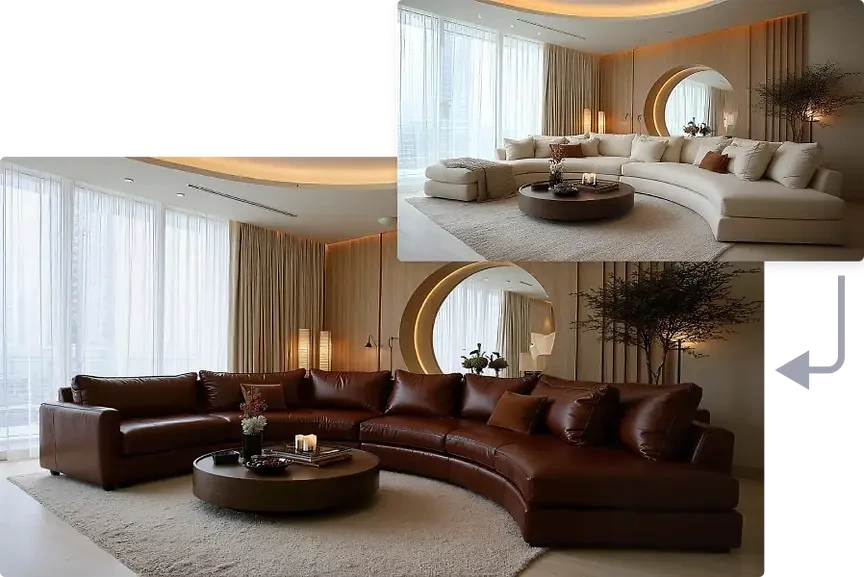
Showcase stunning photorealistic interior designs rendered by Archivinci.

Explore AI-powered tools for interior design, furnishing, and style transfer.
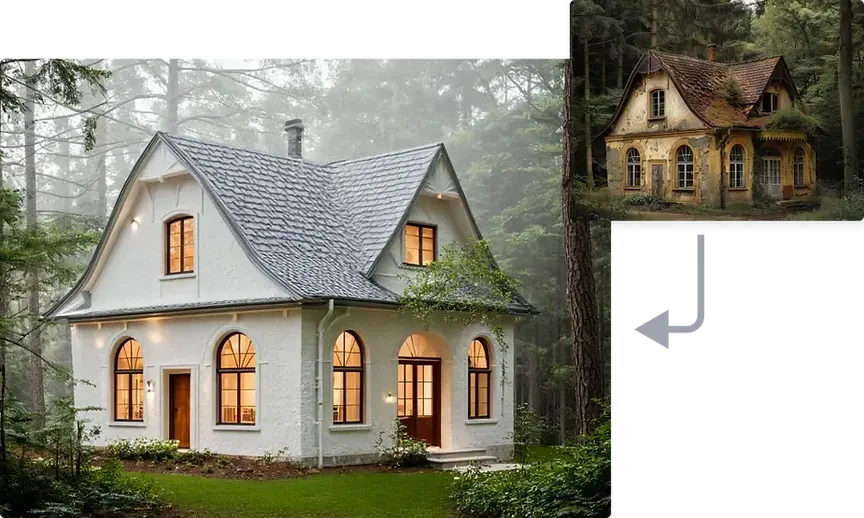
Explore architectural transformations from pristine modern designs to rustic aged aesthetics.

AI-powered architectural rendering generated instantly from a design.
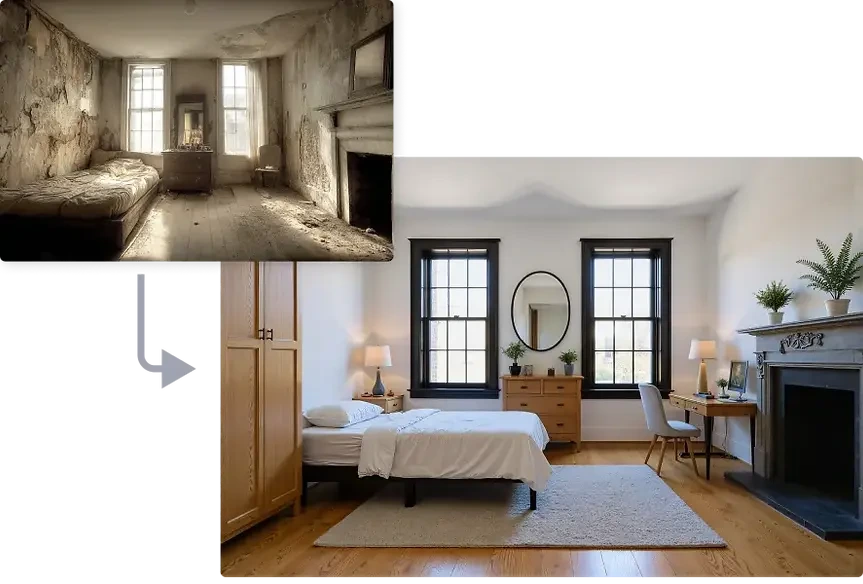
Visualize breathtaking room transformations from any starting point.

Transform interiors by furnishing, modifying, or removing furniture with AI.
ArchiVinci Review: Tooliverse Consensus



Based on 2k+ verified reviews across 4 platforms,
combined with Tooliverse's expert analysis
ArchiVinci bridges the gap between rough conceptual sketches and photorealistic client presentations, delivering render quality that rivals traditional engines at a fraction of the time investment. The geometry-aware AI preserves design intent while adding realistic lighting and materials, making it a top-tier tool for architects who need to visualize ideas quickly during early design phases. The platform occasionally struggles with complex structural geometry and lacks direct BIM integration, but for pure visualization speed and stylistic flexibility, it outpaces alternatives in the AI rendering space.
Bottom line: A leading AI rendering platform that transforms architectural sketches into photorealistic visuals in seconds, though complex geometry sometimes requires manual CAD correction before technical documentation.
ArchiVinci | Key Specs
- Platforms
- Web, iOS, Android, macOS, Windows, Linux
- Pricing Model
- Freemium ($0-25/mo) See plans
- Max Resolution
- High-resolution with AI upscaler
- Generation Time
- Under 1 minute (typically seconds)
Wins
- •Transforms rough hand-drawn sketches into photorealistic architectural renders with impressive speedmentioned in 214 reviews
- •Offers a wide variety of architectural styles that cater to diverse client preferencesmentioned in 186 reviews
- •Provides an intuitive interface that allows non-technical users to generate professional designsmentioned in 154 reviews
Watch-Outs
- •Occasionally struggles with complex structural geometry, requiring manual correction in CADmentioned in 84 reviews
- •Subscription costs are perceived as high for individual freelancers or small studiosmentioned in 72 reviews
- •The mobile app experience lacks some of the advanced fine-tuning features found on webmentioned in 58 reviews
ArchiVinci Features 2026
Geometry-Aware AI Rendering
Near-100% geometry tracking with smart alerts when prompts may distort original structure. Preserves textures, materials, and surface detail with precision that rivals traditional render engines.
Sketch to Photorealistic Render
Upload hand sketches, concept drawings, or rough design images and transform them into photorealistic architectural renders with materials, lighting, and atmosphere.
Parallel Render Variations
Generate up to 4 render variations simultaneously from one input without rerendering one by one. Test multiple design directions, materials, and lighting conditions instantly.
Browser-Based Cloud Rendering
No GPU, workstation, or installation required. Runs entirely in the browser with cloud processing, accessible from any device including tablets and mobile.
ArchiVinci User Reviews
Selected Reviews
"ArchiVinci has completely transformed how I present initial concepts to my clients. The speed at which it turns a napkin sketch into a realistic render is simply mind-blowing."
"I've tried several AI architecture tools, and this one has the most consistent output quality. It doesn't feel like a toy; it feels like a professional utility."
"The variety of styles is great, but it sometimes hallucinates weird structural elements that wouldn't actually stand up. Still, for pure visualization, it's the best I've used."
More from the Community
"I love the lighting effects in the renders. It captures the "golden hour" perfectly without me having to spend hours tweaking settings in V-Ray."
"It's a solid tool for brainstorming, but the pricing is a bit steep for a solo freelancer. I'd love to see a more flexible credit-based system."
"The web version is much more powerful than the app. I find myself using the desktop site for any serious work because the controls are more precise."
"Impressive results for exterior shots, though the interior furniture generation can be a bit hit or miss. It's getting better with every update though."
"The AI is surprisingly good at maintaining the proportions of my original floor plan while adding realistic textures and depth."
"I love the lighting effects in the renders. It captures the "golden hour" perfectly without me having to spend hours tweaking settings in V-Ray."
"It's a solid tool for brainstorming, but the pricing is a bit steep for a solo freelancer. I'd love to see a more flexible credit-based system."
"The web version is much more powerful than the app. I find myself using the desktop site for any serious work because the controls are more precise."
"Impressive results for exterior shots, though the interior furniture generation can be a bit hit or miss. It's getting better with every update though."
"The AI is surprisingly good at maintaining the proportions of my original floor plan while adding realistic textures and depth."
"Useful for quick mockups, but I still have to do a lot of post-processing in Photoshop to get it exactly where I want it for final presentations."
"Finally an AI tool that actually understands what a "modern minimalist" style means without just making everything white and empty."
"The customer support team was very responsive when I had an issue with my subscription renewal. The tool itself is top-notch for rapid prototyping."
"Great for exterior visualization, but it struggles with specific material requests like "recycled timber"—it just looks like standard wood."
"Useful for quick mockups, but I still have to do a lot of post-processing in Photoshop to get it exactly where I want it for final presentations."
"Finally an AI tool that actually understands what a "modern minimalist" style means without just making everything white and empty."
"The customer support team was very responsive when I had an issue with my subscription renewal. The tool itself is top-notch for rapid prototyping."
"Great for exterior visualization, but it struggles with specific material requests like "recycled timber"—it just looks like standard wood."
ArchiVinci Pricing 2026
The free tier's three renders let you test the platform, but Premium at $25 monthly is where most professionals land: unlimited renders across all core modules means you can iterate freely on materials, lighting, and styles without counting credits. The coin-based system for specialized modules like 360° HDRI and image-to-video adds flexibility, though it complicates budgeting if you use those features heavily. For solo architects and small studios generating dozens of client presentations monthly, the flat unlimited rate is straightforward value.
ArchiVinci In-Depth Review 2026

This browser-based AI rendering platform serves over 761,000 registered users across 165 countries, generating photorealistic architectural and interior design renders from sketches, photos, and model exports. It runs entirely online with cloud processing, meaning you don't need a workstation GPU or even SketchUp installed. Upload an image, describe what you want, and the AI interprets geometry, lighting, and materials to produce client-facing visuals in under a minute.
What It's Like Day-to-Day
The workflow centers on speed and iteration rather than precision modeling. You screenshot a Revit elevation, upload it, specify "modern minimalist exterior, evening lighting, concrete and glass," and ArchiVinci generates four variations simultaneously. The geometry-aware engine preserves your original structure while adding realistic textures, shadows, and atmospheric effects that would take hours to set up in traditional rendering software. One iOS reviewer noted it "has completely transformed how I present initial concepts to my clients" with speed that is "simply mind-blowing."
The lighting engine is where it pulls ahead of competitors. Golden hour warmth, overcast diffusion, dramatic interior spotlighting—it captures these moods without the manual light placement and bounce calculations that make conventional rendering such a time sink.
ArchiVinci: Frequently Asked Questions (FAQs)
What is rendering in architecture?
In architecture, rendering is the process of creating a two-dimensional image or animation that shows what a proposed design will look like in real life. It acts as the bridge between technical blueprints and visual reality. A good architectural rendering communicates form, scale, lighting, material quality, and atmosphere. AI rendering makes this process faster by allowing users to create architectural renderings from sketches, photos, plans, or model screenshots.
What is AI rendering?
AI rendering (artificial intelligence rendering) is a technology that uses machine learning and neural networks to generate or enhance photorealistic images from 3D models, sketches, or text. In architecture, AI render tools help turn early design inputs into realistic architecture renders faster than traditional manual rendering workflows.
Does AI rendering replace architects?
No. AI rendering does not replace architects or professional design judgment. It works as a visual assistant that helps architects create renderings, compare design ideas, test visual directions, and communicate design intent more clearly.
How does ArchiVinci's AI rendering generator work?
ArchiVinci works as an AI render generator by analyzing your uploaded image, design input, or architectural reference, then generating a realistic render based on your prompt. It interprets uploaded visual inputs such as hand sketches, room photographs, floor plans, or screenshots exported from CAD or 3D modeling software. The AI rendering engine analyzes elements such as composition, perspective, geometry, scale, and spatial context, then generates a realistic architectural visual according to the user's prompt.
ArchiVinci Integrations
| SketchUp | Revit | Rhino |
| Blender | 3ds Max | Archicad |
| AutoCAD |
ArchiVinci: Verified Data Sheet
| # | Label | Data Point |
|---|---|---|
| [1] | ArchiVinci Consensus: 9.04/10 | ArchiVinci is one of the highest-rated AI design tools in the Tooliverse index, with a consensus score of 9.04/10 across 2,345 verified reviews. |
| [2] | What is ArchiVinci | ArchiVinci is a browser-based AI rendering platform for architecture and interior design, serving 761,362+ registered users across 165+ countries. The platform generates photorealistic renders from sketches, photos, and CAD screenshots in seconds, with pricing starting at $25/month for unlimited renders. |
| [3] | Tooliverse Consensus on ArchiVinci | ArchiVinci bridges the gap between rough conceptual sketches and photorealistic client presentations, delivering render quality that rivals traditional engines at a fraction of the time investment. The geometry-aware AI preserves design intent while adding realistic lighting and materials, making it a top-tier tool for architects who need to visualize ideas quickly during early design phases. The platform occasionally struggles with complex structural geometry and lacks direct BIM integration, but for pure visualization speed and stylistic flexibility, it outpaces alternatives in the AI rendering space. |
| [4] | ArchiVinci Verdict | ArchiVinci bottom line: A leading AI rendering platform that transforms architectural sketches into photorealistic visuals in seconds, though complex geometry sometimes requires manual CAD correction before technical documentation. |
| [5] | Free: Free | ArchiVinci provides a functional Free tier with 3 free AI renders and no watermark, making professional rendering accessible at no cost. |
| [6] | Sketch-to-render transformation | ArchiVinci transforms rough hand-drawn sketches into photorealistic architectural renders with impressive speed, validated as a core strength by 214 user reviews. |
| [7] | Diverse architectural styles | ArchiVinci offers a wide variety of architectural styles that cater to diverse client preferences, with 186 user reviews highlighting this flexibility as a key advantage. |
| [8] | Intuitive for non-technical users | ArchiVinci provides an intuitive interface that allows non-technical users to generate professional designs, confirmed by 154 user reviews praising its accessibility. |
| [9] | Realistic lighting and textures | ArchiVinci features high-quality lighting and texture generation that enhances the realism of renders, with 132 user reviews validating this capability as a standout feature. |
| [10] | Premium: $25/month | ArchiVinci Premium empowers users with Unlimited AI renders for just $25 monthly, significantly expanding on the free tier's capabilities. |
| [11] | Complex geometry limitations | ArchiVinci occasionally struggles with complex structural geometry, requiring manual correction in CAD software according to 84 user reports. |
| [12] | High cost for freelancers | ArchiVinci subscription costs are perceived as high for individual freelancers or small studios, with 72 user reviews citing pricing as a barrier to adoption. |
| [13] | Transforms client presentations | ArchiVinci "has completely transformed how I present initial concepts to my clients" with sketch-to-render speed that is "simply mind-blowing," according to a verified iOS App Store reviewer. |
Compare ArchiVinci with…

Best ArchiVinci Alternatives

Rendair AI
Transform sketches, 3D models, and floor plans into photorealistic architectural renders in seconds with AI.

mnml.ai
Transform sketches and 3D models into photorealistic architectural renders in seconds with AI.

Spacely AI
Turn sketches into photorealistic renders in under 60 seconds—no modeling skills required.