
Clean Email Review 2026 - Bulk Email Organizer
Verified Jun 9, 2026 by Tooliverse Editorial
Clean Email transforms chaotic inboxes into organized workspaces—unsubscribe from hundreds of newsletters at once, block spam automatically, and set rules that keep your email tidy forever. Over 1.5 million users trust it to manage 5 billion emails yearly.
Is Clean Email Safe? The Truth About Privacy, Security, and Trust
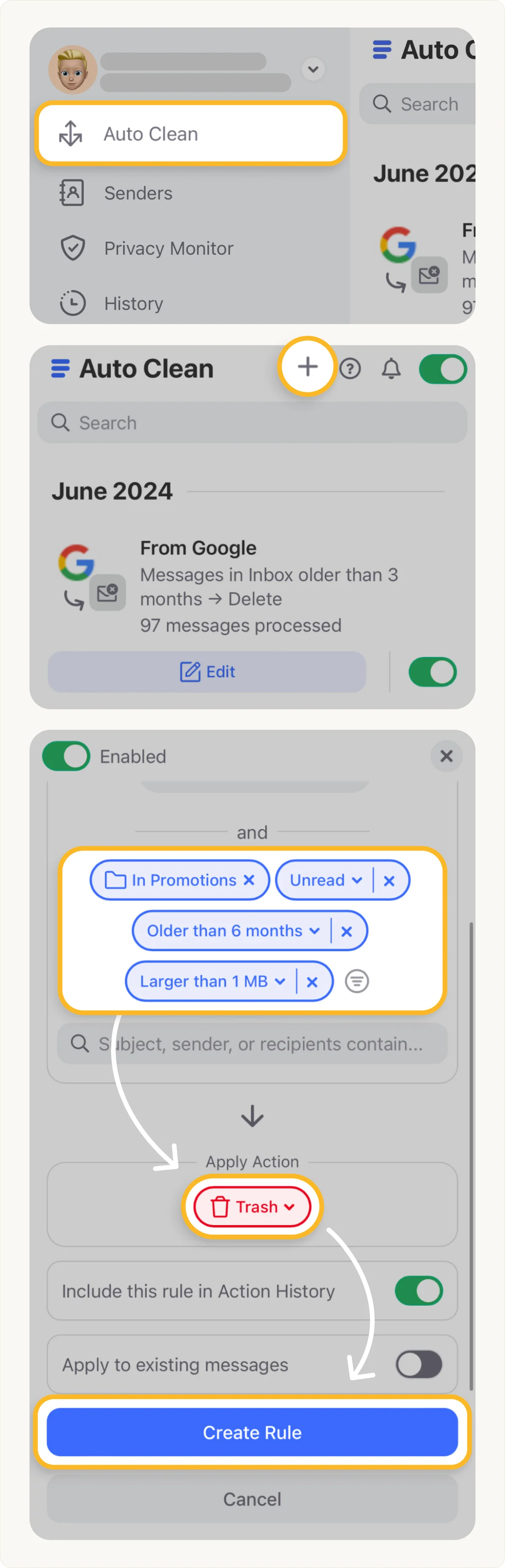
Automate email cleanup by defining custom rules based on age, size, and category.
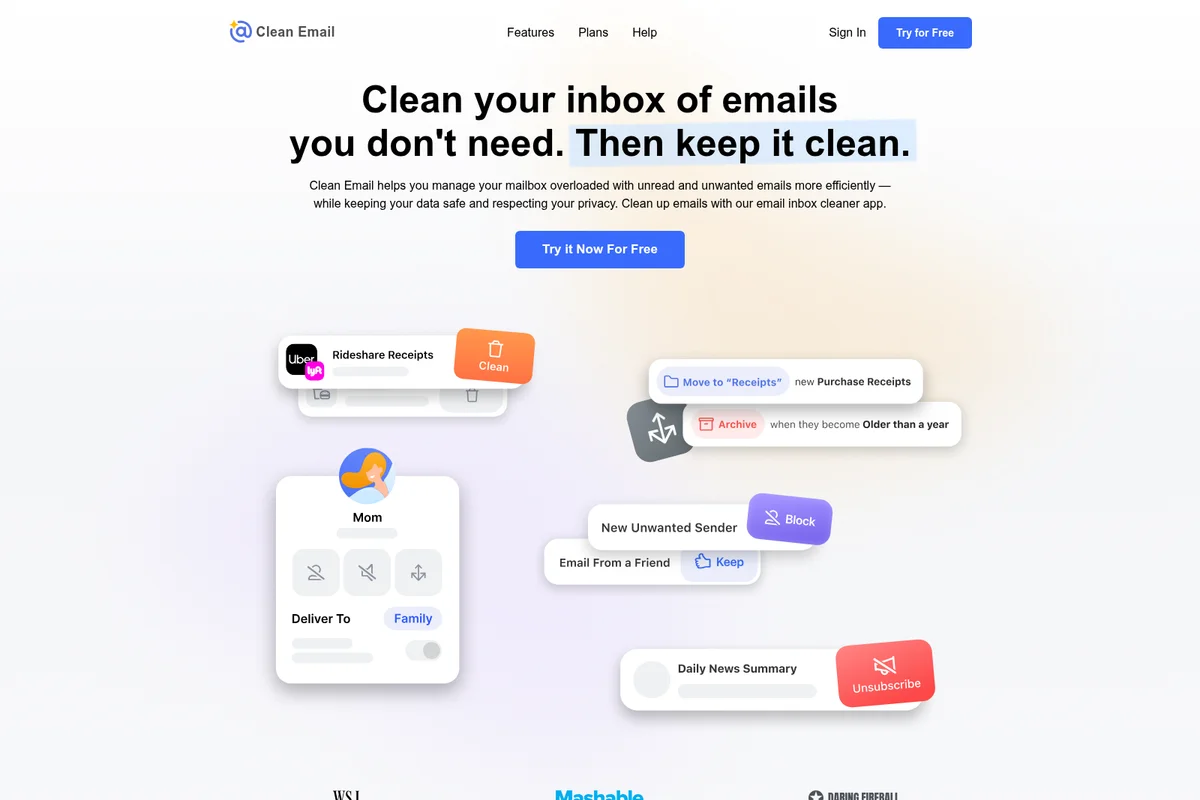
Effortlessly clean, manage, and organize your email inbox with smart actions.
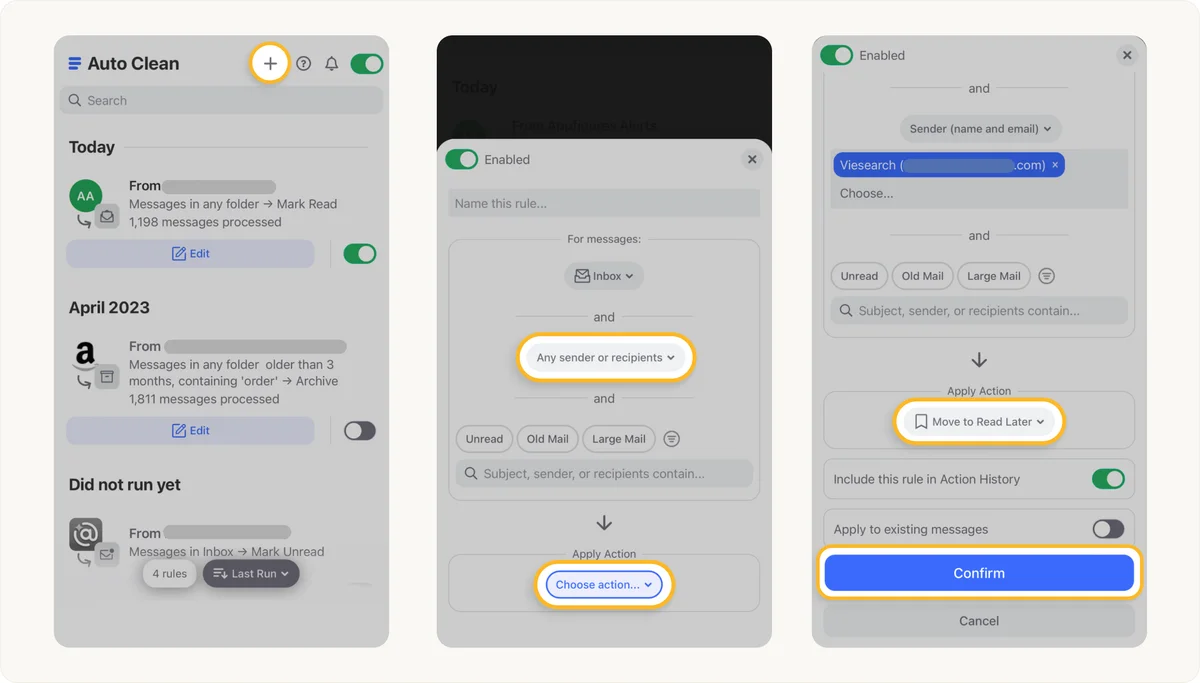
Automate email organization and inbox cleaning with custom rules.
Automate email management with custom rules for specific senders.
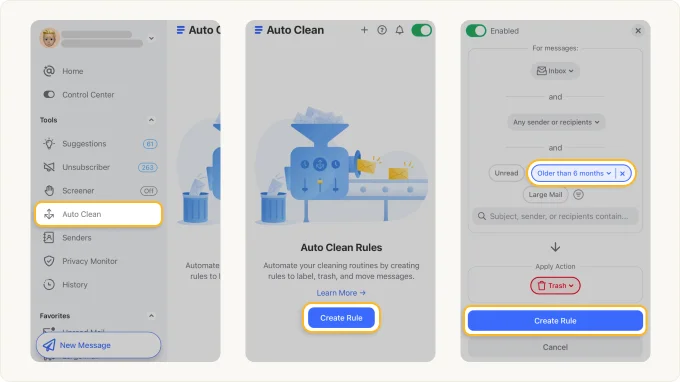
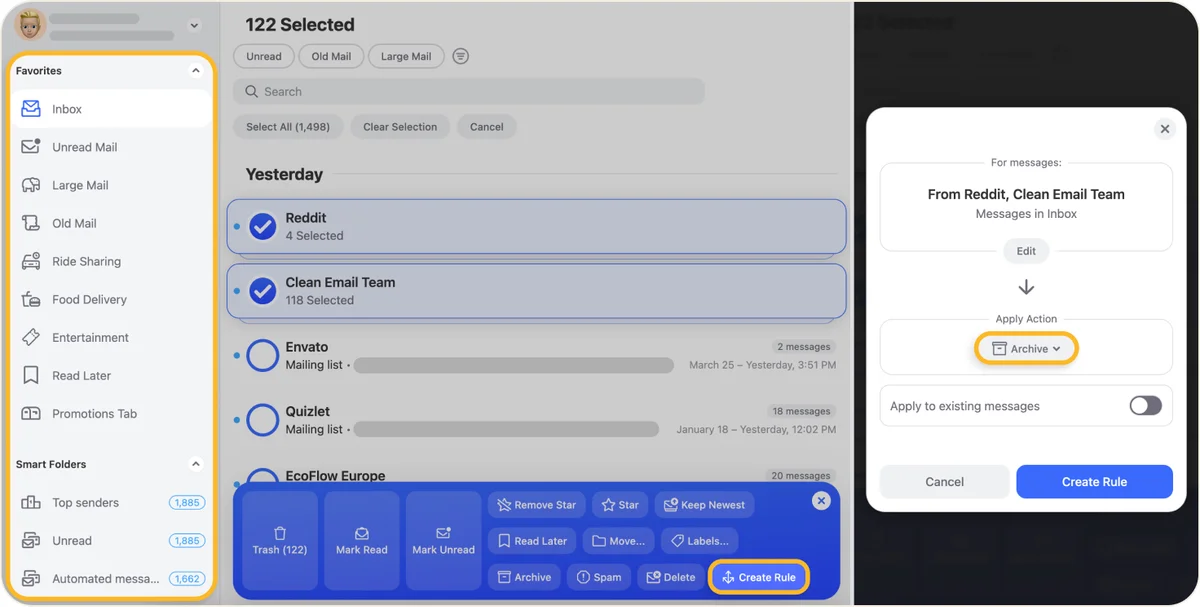
Automate email cleaning by setting rules to manage old or unwanted messages.
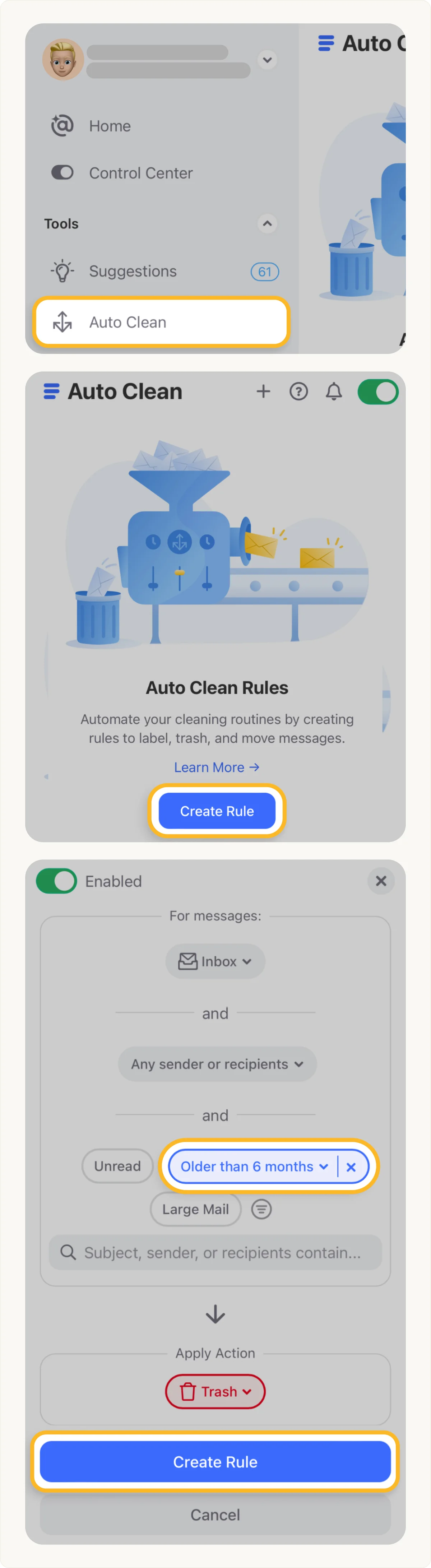
Automate email cleanup: create rules to trash old messages directly from your inbox.
Clean Email Review: Tooliverse Consensus






Based on 3k+ verified reviews across 6 platforms,
combined with Tooliverse's expert analysis
Clean Email stands as the definitive privacy-first email automation platform, transforming cluttered inboxes into organized workspaces through sophisticated bulk-cleaning tools and persistent Auto Clean rules that handle unsubscribing, sorting, and archiving at scale. The platform's strict privacy model—analyzing only headers and metadata, never content—combined with Google certification and a decade of operational history, makes it the gold standard for users who refuse to trade inbox sanity for data harvesting. The subscription cost and slow initial indexing are the tradeoffs, but for professionals drowning in email volume, the time savings justify the investment.
Bottom line: The gold standard for email cleanup and automation that respects your privacy while saving hours weekly, though the subscription cost and initial indexing time are real considerations for casual users.
Clean Email | Key Specs
- Platforms
- Web, iOS, Android, macOS
- Pricing Model
- Paid subscription (no free tier) See plans
- Privacy/Data Use
- Never reads email content, only headers/metadata. No data sharing or selling.
- Security
- Google Certified, encrypted credentials, annual security audits See details
Wins
- •Automates inbox maintenance with powerful 'Auto Clean' rules that save hours weeklymentioned in 842 reviews
- •Simplifies bulk unsubscribing from newsletters with a single, efficient dashboardmentioned in 756 reviews
- •Maintains strict user privacy by never selling data to third partiesmentioned in 512 reviews
Watch-Outs
- •Requires a recurring subscription fee which some users find expensive for utility softwarementioned in 312 reviews
- •Initial mailbox indexing can take significant time for accounts with large archivesmentioned in 184 reviews
- •Automated rules occasionally miscategorize important emails if not configured with precisionmentioned in 145 reviews
Clean Email Features 2026
Auto Clean Rules
Create automation rules to automatically move, delete, archive, star, or organize emails based on sender, keywords, subject, age, Smart Folders, and other criteria. Rules apply to new incoming emails and can process existing messages in bulk.
Unsubscriber
View all subscriptions and newsletters in one unified list. Search, select, and unsubscribe from emails in bulk quickly and easily. Clean Email automatically unsubscribes for you, even from lists without unsubscribe links.
Screener
Acts as a personal assistant blocking all mail from unknown senders before it reaches your inbox. Review screened senders and decide who to keep and who to remove. Add trusted email addresses, domains, and keywords to ensure important mail is always delivered.
Smart Folders
Predefined filters that automatically gather messages from categories like Social Networks, Rideshare, Food Delivery, Online Shopping, Newspapers and Magazines, and more. Clean them in bulk without manually defining senders.
Clean Email User Reviews
Selected Reviews
"Finally found a tool that actually unsubscribes me from junk instead of just hiding it. The Auto Clean feature is a lifesaver for my work Gmail, especially with the ability to set specific rules for different senders and keywords that I use every single day."
"The interface is beautiful and much faster than the native Gmail app for bulk actions. Highly recommend for anyone with inbox anxiety."
"It works well but the initial sync took forever. I thought it was frozen because I have over 100,000 emails, but it eventually finished and the cleanup was incredibly thorough. Just be patient if you have a massive archive like I do."
More from the Community
"Clean Email is the only reason I haven't deleted my 15-year-old Yahoo account. It cleared 40k unread messages in minutes."
"I love the privacy focus. Most 'free' cleaners sell your data, but I'm happy to pay for a service that respects my inbox."
"Great for cleaning up, but the subscription price is a bit steep for what it does. I wish there was a lifetime license option."
"The 'Screener' feature is brilliant. It catches new senders instantly."
"Very effective tool, though I had some trouble setting up my custom IMAP server. Support was helpful but took two days to reply."
"Clean Email is the only reason I haven't deleted my 15-year-old Yahoo account. It cleared 40k unread messages in minutes."
"I love the privacy focus. Most 'free' cleaners sell your data, but I'm happy to pay for a service that respects my inbox."
"Great for cleaning up, but the subscription price is a bit steep for what it does. I wish there was a lifetime license option."
"The 'Screener' feature is brilliant. It catches new senders instantly."
"Very effective tool, though I had some trouble setting up my custom IMAP server. Support was helpful but took two days to reply."
"I've tried every email organizer and this is the most consistent. The rules actually stay active and keep the junk away permanently."
"A bit of a learning curve, but once it's set up, it's magic."
"Solid app, but I occasionally find important receipts in the 'Read Later' folder by mistake. Check your rules carefully!"
"Good service, but the mobile app feels a bit less powerful than the desktop web version. Still useful for quick triage."
"I've tried every email organizer and this is the most consistent. The rules actually stay active and keep the junk away permanently."
"A bit of a learning curve, but once it's set up, it's magic."
"Solid app, but I occasionally find important receipts in the 'Read Later' folder by mistake. Check your rules carefully!"
"Good service, but the mobile app feels a bit less powerful than the desktop web version. Still useful for quick triage."
Clean Email In-Depth Review 2026

Clean Email analyzes email headers and metadata to group thousands of messages by sender, category, or behavior, letting you clean, organize, or automate actions in bulk without touching individual emails. It works across Gmail, Outlook, iCloud, Yahoo, and any IMAP provider, operating as a layer on top of your existing email rather than replacing it. The privacy-first approach means it never reads your actual email content, only the routing information that identifies patterns.
What It's Like Day-to-Day
The Auto Clean rules are where the tool earns its keep. You set conditions once—archive everything from a specific domain after seven days, delete promotional emails older than 30 days, move receipts to a folder automatically—and the rules run continuously on incoming mail. One iOS App Store reviewer noted that Clean Email "actually unsubscribes me from junk instead of just hiding it," calling the Auto Clean feature "a lifesaver for my work Gmail." The difference between hiding and actually unsubscribing matters: one reduces clutter temporarily, the other stops the problem at the source.
Clean Email Security & Compliance
Verified Compliance
- Google Certified
Security Features
- Encrypted mailbox access credentials
- Remote content blocking (tracking pixels)
Privacy Commitments
- Never shares or sells personal or email data
- Only analyzes email headers and metadata, never content or attachments
- Mailbox access details encrypted and unavailable to Clean Email staff
- No advertising in app (paid subscription model)
- Annually audited by independent security companies
Clean Email: Verified Data Sheet
| # | Label | Data Point |
|---|---|---|
| [1] | Clean Email Consensus: 9.02/10 | Clean Email is one of the highest-rated AI productivity tools in the Tooliverse index, with a consensus score of 9.02/10 across 3,730 verified reviews. |
| [2] | What is Clean Email | Clean Email, operated by Clean Email LLC and headquartered in Los Angeles, is a Google-certified email management platform that analyzes headers and metadata (never content) to organize inboxes. The service has cleaned 5 billion emails yearly for 1.5 million users over 10 years in business. |
| [3] | Tooliverse Consensus on Clean Email | Clean Email stands as the definitive privacy-first email automation platform, transforming cluttered inboxes into organized workspaces through sophisticated bulk-cleaning tools and persistent Auto Clean rules that handle unsubscribing, sorting, and archiving at scale. The platform's strict privacy model—analyzing only headers and metadata, never content—combined with Google certification and a decade of operational history, makes it the gold standard for users who refuse to trade inbox sanity for data harvesting. The subscription cost and slow initial indexing are the tradeoffs, but for professionals drowning in email volume, the time savings justify the investment. |
| [4] | Clean Email Verdict | Clean Email bottom line: The gold standard for email cleanup and automation that respects your privacy while saving hours weekly, though the subscription cost and initial indexing time are real considerations for casual users. |
| [5] | Auto Clean rules save hours weekly | Clean Email automates inbox maintenance with powerful Auto Clean rules that save users hours weekly, validated as a critical time-saver by 842 user reviews. |
| [6] | Bulk unsubscribe dashboard | Clean Email simplifies bulk unsubscribing from newsletters through a unified dashboard that processes multiple subscriptions simultaneously, praised as highly efficient in 756 user reviews. |
| [7] | Never sells user data | Clean Email maintains strict user privacy by never selling data to third parties and analyzing only email headers and metadata rather than content, a commitment validated by 512 user reviews. |
| [8] | Intuitive interface design | Clean Email features a modern, intuitive interface that makes complex email management feel effortless, with the design praised for accessibility in 428 user reviews. |
| [9] | Subscription cost concerns | Clean Email requires a recurring subscription fee which some users find expensive for utility software, with pricing concerns raised in 312 user reviews. |
| [10] | Slow indexing for large archives | Clean Email's initial mailbox indexing can take significant time for accounts with large archives, with 184 users reporting extended processing periods for mailboxes exceeding 100,000 emails. |
| [11] | Google Certified | Clean Email ensures Google Certified certification. |
| [12] | Enterprise: Encrypted mailbox access credentials | Clean Email provides enterprise security with Encrypted mailbox access credentials and Remote content blocking (tracking pixels). |
| [13] | Auto Clean saves hours on work email | Clean Email "actually unsubscribes me from junk instead of just hiding it" and the Auto Clean feature is "a lifesaver for my work Gmail" with rule-based filtering for specific senders and keywords, according to a verified iOS App Store reviewer. |
Best Clean Email Alternatives
SaneBox
Restore sanity to your inbox by automatically filtering unimportant emails into separate folders.
Spark Mail
Smart, focused email that filters out the noise so you can focus on what's important.
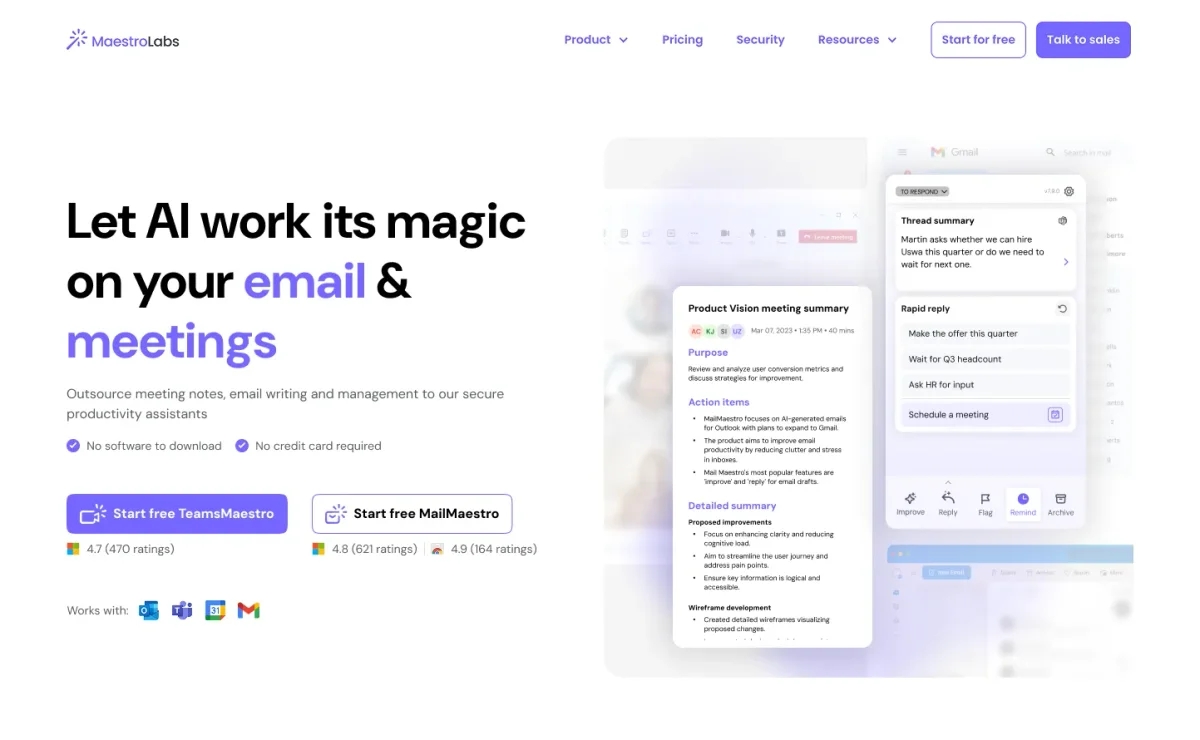
MailMaestro
Turn cluttered inboxes and chaotic meetings into clear, effortless productivity with AI.