
Napkin AI Review 2026 - Text to Visuals
Verified Jun 17, 2026 by Tooliverse Editorial
Napkin AI transforms plain text into professional diagrams, infographics, and flowcharts instantly. Paste your ideas, click generate, and watch AI create visuals you can customize and export anywhere—perfect for presentations, blogs, and social media.
Introducing Next-Generation Flowcharts 🚀 #napkinai
Napkin AI Complete Tutorial 2026 | Turn Your Text Into Stunning Visuals in Seconds with Napkin AI
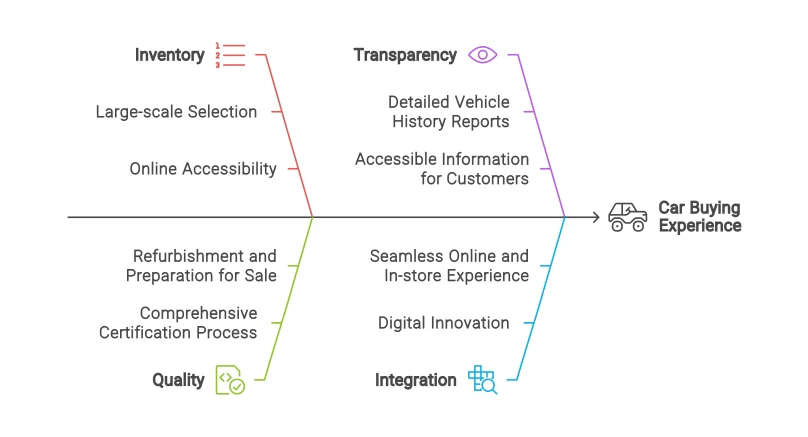
Visualize complex factors influencing customer experience with clear, concise diagrams.
Turn your text ideas into engaging visuals quickly and effectively.
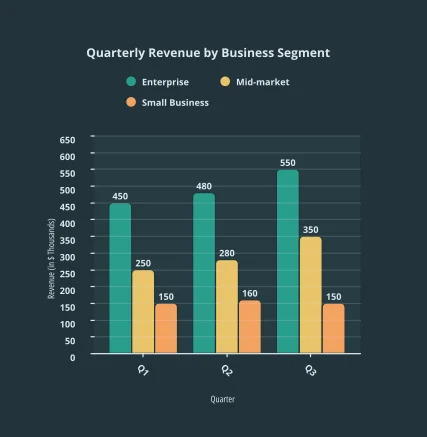
Visualize quarterly revenue trends across business segments.
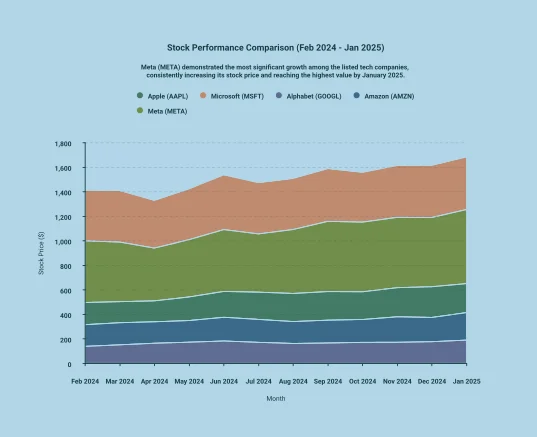
Explores stock performance comparison for major tech companies, highlighting growth trends.
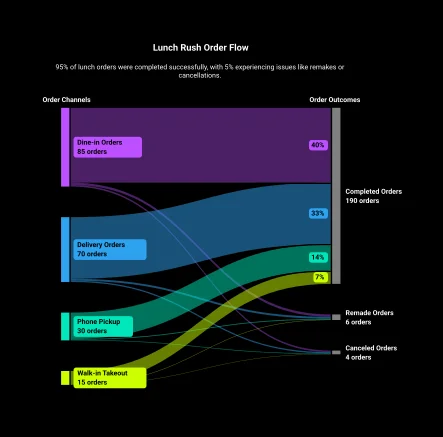
Visualize order channels and outcomes to identify bottlenecks and optimize operations.
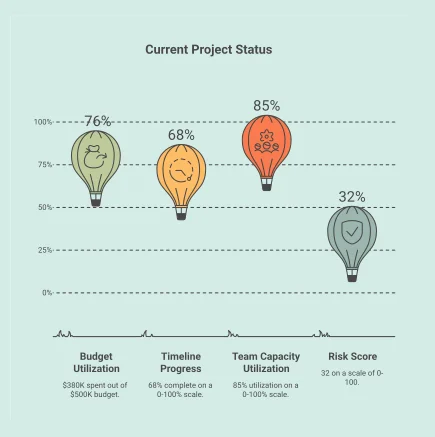
Visualize key project metrics for budget, timeline, team capacity, and risk score.
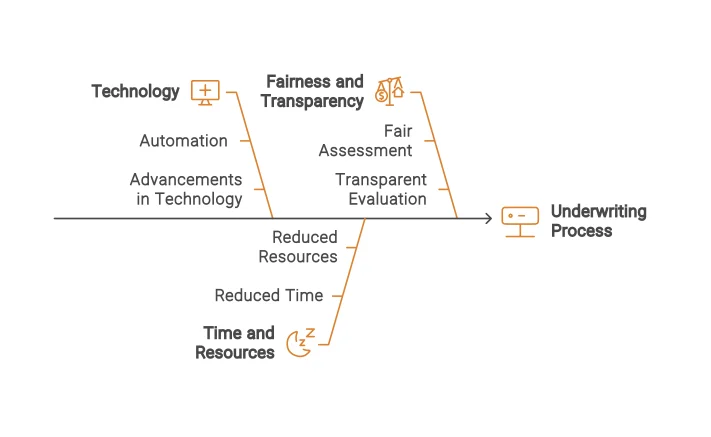
AI-generated fishbone diagram visualizing key factors influencing the underwriting process.
Napkin AI Review: Tooliverse Consensus





Based on 305 verified reviews across 4 platforms,
combined with Tooliverse's expert analysis
Napkin AI operates as a specialized micro-design tool that converts text into presentation-ready diagrams in under ten seconds, eliminating the manual formatting work that consumes hours in traditional design software. The intelligent text parsing and multi-format export capabilities make it particularly effective for professionals who need visual clarity without design expertise, validated across hundreds of reviews. The tool requires well-structured input text for optimal results and focuses on individual diagrams instead of full presentation assembly, but those constraints are the deliberate tradeoff for its speed and simplicity.
Bottom line: A leading text-to-visual tool that transforms written ideas into professional diagrams faster than any alternative, though it demands structured input and handles single diagrams rather than complete decks.
Napkin AI | Key Specs
- Platforms
- Web
- Pricing Model
- Freemium ($0-22/user/month) See plans
- Privacy/Data Use
- No AI training on customer data (opt-out available), GDPR compliant
- Security
- AES-256 encryption, TLS 1.2+, MFA, RBAC See details
Wins
- •Generates professional diagrams from raw text in under ten secondsmentioned in 142 reviews
- •Features an incredibly intuitive interface that requires zero design expertisementioned in 118 reviews
- •Delivers high-resolution exports across PNG, SVG, PDF, and PPTX formatsmentioned in 94 reviews
Watch-Outs
- •Requires well-structured input text to produce the highest quality visual resultsmentioned in 42 reviews
- •Offers limited customization for specific brand colors and advanced font stylingmentioned in 38 reviews
- •Focuses narrowly on individual diagrams rather than building full presentation decksmentioned in 31 reviews
Napkin AI Features 2026
Text-to-Visual Generation
Automatically generates multiple visual options (infographics, diagrams, mind maps, flowcharts, data charts) directly from pasted or imported text without requiring prompts or templates.
Multi-Format Export
Export visuals as PowerPoint (.ppt), PNG, PDF, or SVG files for use in presentations, documents, websites, and social media.
Multi-Format File Import
Import content from PowerPoint, Word, PDF, HTML, and Markdown files to instantly generate visuals from existing documents.
Full Visual Customization
Modify colors, reshape elements, and adjust layouts freely to match your brand or creative vision after AI generation.
Napkin AI User Reviews
Selected Reviews
"I pasted a few paragraphs from one of my blog posts, and within minutes it turned the content into clean visuals, flowcharts, and infographic-style designs. It handled most of the work automatically."
"Napkin AI is the fastest text-to-visual tool available in 2026 for generating individual diagrams and infographics. It does something genuinely narrow and does it better than any competitor."
"Output quality is solid. The visuals generated are high resolution and export cleanly across PNG, SVG, and PDF. It focuses on clarity rather than being cookie-cutter."
More from the Community
"Transforms scattered ideas into actionable plans effortlessly. It's an innovative platform that transforms textual content into compelling visuals without requiring design expertise."
"Napkin AI isn't perfect. There are frustrations and real limitations. It's not a full presentation builder, so you still have to drop the assets into PowerPoint manually."
"One thing I noticed is that the tool works much better when the original text is already well structured. I tested messy text first and the output was average."
"It solves one specific, painful problem: turning written ideas into slide-ready visuals without spending 20 minutes wrestling with shapes and connectors."
"The AI occasionally struggles with abstract requirements or niche shape designs because its visual logic is based on predefined layout families. Needs more custom shapes."
"Transforms scattered ideas into actionable plans effortlessly. It's an innovative platform that transforms textual content into compelling visuals without requiring design expertise."
"Napkin AI isn't perfect. There are frustrations and real limitations. It's not a full presentation builder, so you still have to drop the assets into PowerPoint manually."
"One thing I noticed is that the tool works much better when the original text is already well structured. I tested messy text first and the output was average."
"It solves one specific, painful problem: turning written ideas into slide-ready visuals without spending 20 minutes wrestling with shapes and connectors."
"The AI occasionally struggles with abstract requirements or niche shape designs because its visual logic is based on predefined layout families. Needs more custom shapes."
"Eight months later, it's still my go-to tool for adding visuals to my articles. It makes visual creation accessible to non-designers like me."
"The PPTX export actually works in PowerPoint, which is a huge relief. Most other AI tools just give you a static image that you can't edit later."
"Users appreciate the easy text-to-visualization conversion, enabling quick, customized, and professional-quality presentations effortlessly. It's a game-changer for my workflow."
"The speed is Napkin's most significant advantage. It consistently transforms text into structured diagrams faster than any traditional design tool I've used."
"Eight months later, it's still my go-to tool for adding visuals to my articles. It makes visual creation accessible to non-designers like me."
"The PPTX export actually works in PowerPoint, which is a huge relief. Most other AI tools just give you a static image that you can't edit later."
"Users appreciate the easy text-to-visualization conversion, enabling quick, customized, and professional-quality presentations effortlessly. It's a game-changer for my workflow."
"The speed is Napkin's most significant advantage. It consistently transforms text into structured diagrams faster than any traditional design tool I've used."
Napkin AI Pricing 2026
View SourceThe free tier with 500 weekly credits works for occasional diagram creation, but Plus at $9 monthly is where most regular users land. That tier includes 10,000 monthly credits (enough for dozens of diagrams), unlimited PowerPoint and SVG exports, and the ability to remove Napkin branding—the features that matter when visuals become part of your regular workflow. Pro at $22 monthly makes sense primarily for teams needing unlimited custom branding and higher volume, with the 30,000 monthly credits supporting multi-channel content production.
Napkin AI In-Depth Review 2026

Napkin AI transforms plain text into diagrams, infographics, and flowcharts automatically. You paste meeting notes, blog paragraphs, or process descriptions, and within seconds it generates multiple visual options across different layout styles. It runs as a web app and Chrome extension, exporting to PowerPoint, PNG, PDF, and SVG for use in presentations, documents, and social media. The defining characteristic is speed: what takes twenty minutes in traditional design tools happens in under ten seconds here.
What It's Like Day-to-Day
The workflow is deliberately minimal. You paste text, Napkin AI parses the hierarchy and relationships, then generates several visual interpretations. The intelligence lies in how it reads structure: bullet points become process flows, comparisons become side-by-side layouts, lists become organized infographics. One Product Hunt reviewer captured it well: the tool "solves one specific, painful problem: turning written ideas into slide-ready visuals without spending 20 minutes wrestling with shapes and connectors." That specificity is the point.
The export quality matters more than you'd expect. The PPTX files open in PowerPoint as editable objects, not flattened images, which means you can adjust colors or text after the fact. The SVG exports scale cleanly for print materials.
Napkin AI Security & Compliance
Verified Compliance
- ISO 27001 (in progress)
Security Features
- AES-256 Encryption at rest
- TLS 1.2+ Encryption in transit
- Multi-factor authentication (MFA)
- Role-based access control (RBAC)
Privacy Commitments
- No AI training on customer data (opt-out available)
- GDPR compliant with EU Standard Contractual Clauses
- CCPA/CPRA compliant (Service Provider designation)
- Zero-data-retention agreements with AI subprocessors
Napkin AI: Frequently Asked Questions (FAQs)
What are AI credits?
AI credits measure app usage for visual generation, with approximately 1 credit charged per word selected for generation. This may change in the future for more complex outputs or advanced features.
Is there a discount on annual billing?
Yes, Napkin AI offers a 25% discount when choosing an annual plan compared to monthly billing.
What payment methods are accepted?
Napkin AI accepts all major credit and debit cards worldwide.
Can I add my company branding to Napkin?
Yes, you can easily add your brand colors and fonts inside the Brand Studio feature (available on Plus and Pro plans).
Napkin AI Integrations
| PowerPoint | Google Slides | Canva |
| Keynote | Medium | Substack |
| WordPress | X | |
| YouTube | Google Docs | |
| Word | Notion | Confluence |
Napkin AI: Verified Data Sheet
| # | Label | Data Point |
|---|---|---|
| [1] | Napkin AI Consensus: 9.36/10 | Napkin AI is one of the highest-rated AI design tools in the Tooliverse index, with a consensus score of 9.36/10 across 305 verified reviews. |
| [2] | What is Napkin AI | Napkin AI, operated by Second Layer, Inc., is a text-to-visual generation platform that automatically creates diagrams, infographics, and flowcharts from plain text. Founded by the Osmo team, the platform serves content creators, presenters, and product managers with pricing starting at $9/month. |
| [3] | Tooliverse Consensus on Napkin AI | Napkin AI operates as a specialized micro-design tool that converts text into presentation-ready diagrams in under ten seconds, eliminating the manual formatting work that consumes hours in traditional design software. The intelligent text parsing and multi-format export capabilities make it particularly effective for professionals who need visual clarity without design expertise, validated across hundreds of reviews. The tool requires well-structured input text for optimal results and focuses on individual diagrams instead of full presentation assembly, but those constraints are the deliberate tradeoff for its speed and simplicity. |
| [4] | Napkin AI Verdict | Napkin AI bottom line: A leading text-to-visual tool that transforms written ideas into professional diagrams faster than any alternative, though it demands structured input and handles single diagrams rather than complete decks. |
| [5] | Free: Free | Napkin AI provides a functional Free tier with 500 AI credits per week and unlimited visual editing, making diagram creation accessible at no cost. |
| [6] | Sub-10-second diagram generation | Napkin AI generates professional diagrams from raw text in under ten seconds, a capability validated across 142 user reviews as transformative for rapid visual creation. |
| [7] | Zero design expertise required | Napkin AI features an incredibly intuitive interface that requires zero design expertise, confirmed by 118 user reviews as accessible to non-designers. |
| [8] | Multi-format high-res exports | Napkin AI delivers high-resolution exports across PNG, SVG, PDF, and PPTX formats, with 94 user reviews highlighting the multi-format flexibility for presentations and documents. |
| [9] | Pro: $22/user/month | Second Layer, Inc.'s Napkin AI Pro empowers users with 30,000 AI credits per month for just $22/user monthly, significantly expanding on the free tier's capabilities. |
| [10] | Intelligent text hierarchy parsing | Napkin AI intelligently interprets text hierarchy to create logical, structured visual layouts, a parsing capability praised in 87 user reviews for producing coherent diagrams without manual intervention. |
| [11] | Requires structured input text | Napkin AI requires well-structured input text to produce the highest quality visual results, a dependency noted in 42 user reviews indicating that messy or unorganized text yields average output. |
| [12] | Limited brand customization depth | Napkin AI offers limited customization for specific brand colors and advanced font styling, with 38 user reviews identifying constraints in matching precise corporate design systems. |
| [13] | ISO 27001 (in progress) | Napkin AI ensures ISO 27001 (in progress) certification. |
| [14] | Enterprise: AES-256 Encryption at rest | Napkin AI provides enterprise security with AES-256 Encryption at rest, TLS 1.2+ Encryption in transit, and Multi-factor authentication (MFA). |
| [15] | Eliminates manual shape formatting | Napkin AI "solves one specific, painful problem: turning written ideas into slide-ready visuals without spending 20 minutes wrestling with shapes and connectors," according to a verified Product Hunt reviewer. |
Best Napkin AI Alternatives
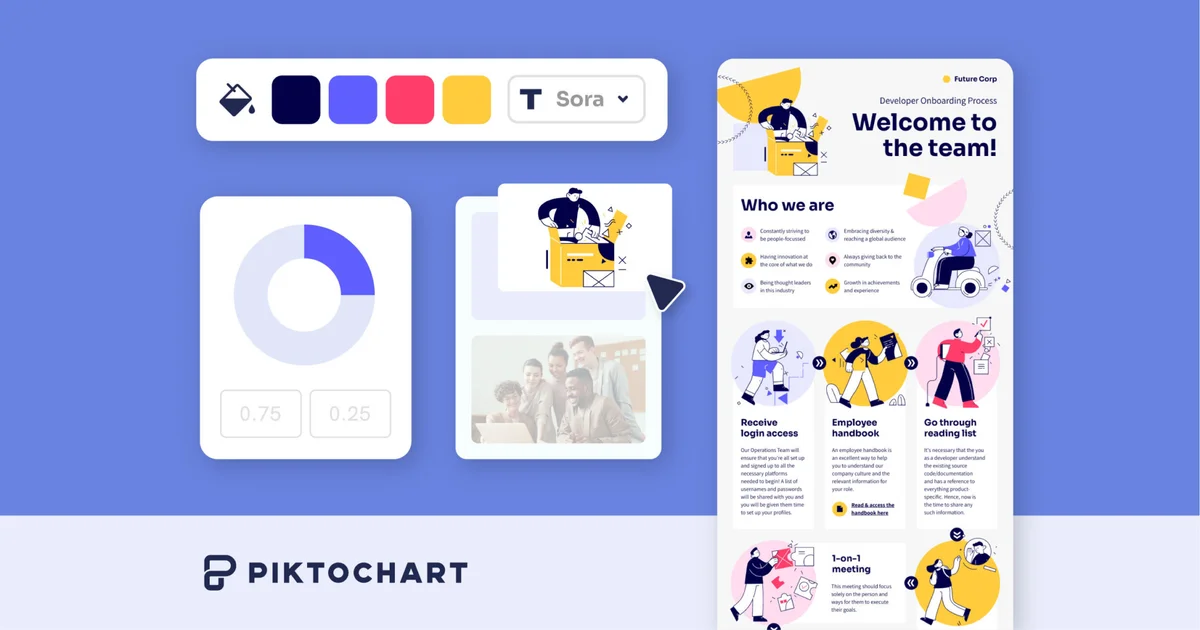
Piktochart
Transform complex ideas into captivating visuals in seconds—no design experience required.
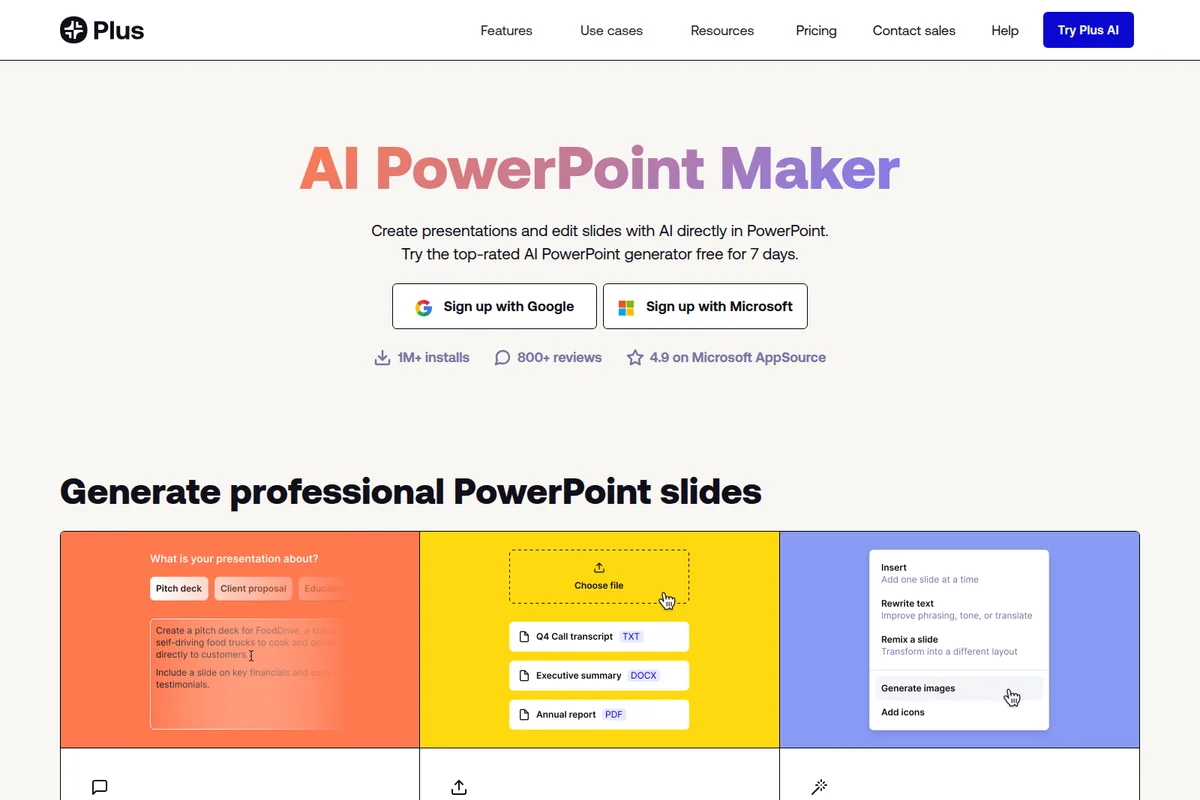
Plus AI
Generate presentations and edit slides with AI—directly in PowerPoint and Google Slides.
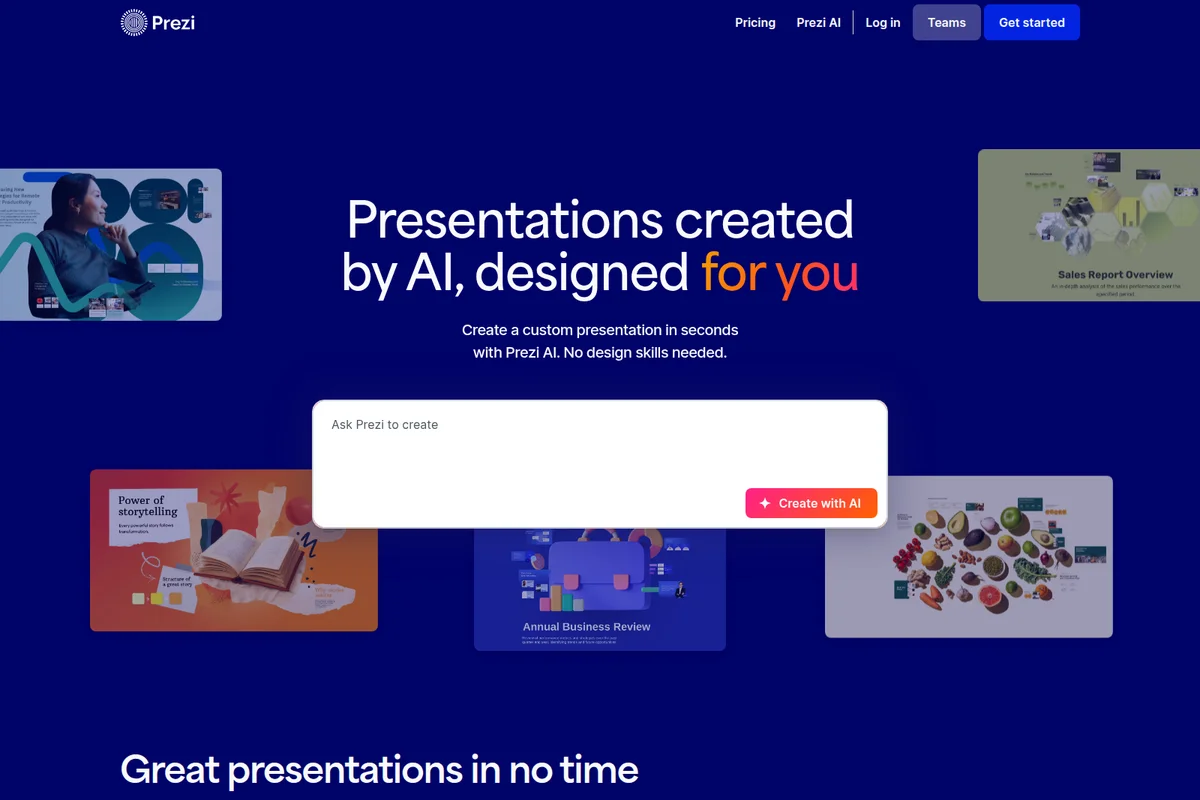
Prezi AI
Create powerful AI presentations in seconds with custom designs tailored to your content.